



.webp)


%20(1).webp)




.png)



Let's say you are sending a credential email to the customer, only for it to land in spam or, worse—be impersonated by scammers. Email providers can’t verify your messages without an SPF record. Not just that, a missing SPF record allows cybercriminals to impersonate your domain, or customers may never receive your emails due to ISP blocking.
The Fix? Instantly create an SPF record tailored to your domain with Smartlead’s SPF Record Generator.

Ensure you send emails only through your authorized servers and reduce spoofing risks while improving deliverability.
Generate SPF Record Now
Check if DKIM records are set up correctly for your domain. Ensure your email authentication policies protect your domain.
Get DKIM RecordStart by entering your domain name in the provided field.
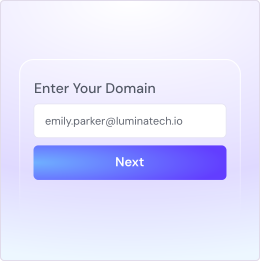
Answer three simple questions:
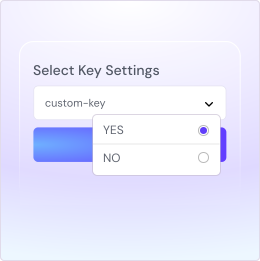
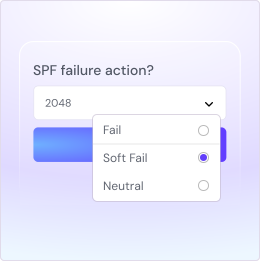
Decide what action to take if SPF fails authentication:
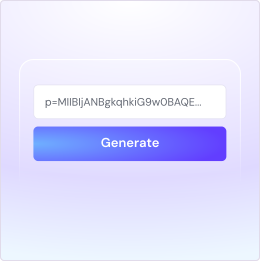
Once you've filled out all the necessary information, click Generate to create your SPF record. Simply copy the generated record and add it to your domain's DNS settings.
An SPF (Sender Policy Framework) record is a DNS record that helps email providers determine whether an email sent from your domain is legitimate. Without SPF, your emails might get blocked, marked as spam, or even spoofed by hackers.
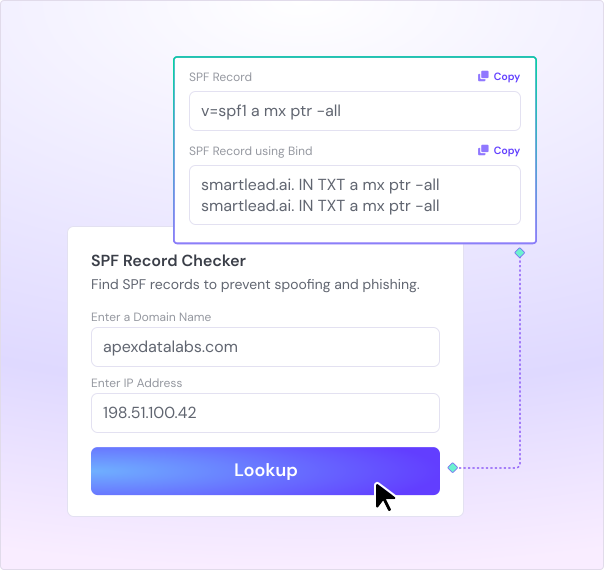
An SPF record works as a security layer that protects your brand, communications, and operations. Without SPF, anyone can send emails using your domain, leading to spoofing attacks, email rejections, and loss of trust.
Here are the common scenarios where having an SPF record isabsolutely essential:

If you’re running outreach or marketing campaigns, email providers check SPF before delivering emails. Without it, your messages may end up in spam, hurting response rates and engagement. SPF increases your sender's credibility, improving campaign performance.

Have you noticed fake emails sent from your domain? Cybercriminals use email spoofing to impersonate businesses, leading to fraud and loss of trust. SPF blocks unauthorized senders, ensuring that only verified servers can send emails from your domain.

Order confirmations, password resets, billing invoices—if these emails aren’t delivered properly, customers can’t complete transactions or access services. SPF helps email providers verify your messages, ensuring seamless communication.

Many businesses use Google Workspace, Outlook, SMTP services, and CRMs for email communication. SPF ensures that all authorized email sources are verified and trusted, reducing email rejections.
Enhance your cold emailing with smart tools for better deliverability, personalization, and engagement.
Explore All Tools


Get AI-native operating system for your enterprise sales team
Book a DemoFounder, StackOptimise
Smartlead's combination of automation, unlimited inboxes, and easy campaign management has completely transformed how we run cold email campaigns.
.jpg)
Founder, Cold Email Hackers

We have about 15 companies and we use Smartlead for all of them.

Founder, DutchSave Media

One of the things I love about using Smartlead is the deliverability feature. If they landed in the bounce or spam folders, we could resolve this quickly.

Co-Founder, Growth Today

I want to continue to use Smartlead to make operations more seamless - the plan is to bring more clients here and build more SOPs.

Founder, FueltoFly

Smartlead listens to the agencies and customers and builds according to what people want, that has really made things easier for us.

Founder, OutboundSync

We build an infrastructure product, and OutboundSync communicates with Smartlead itself. I love the webhook and API. They're really well done and keep getting better.

Founder, Axoleads

With SmartDelivery, you can put all of that in the hands of the tool. It ensures your emails land in inboxes, and by running a simple test, you can see if you're hitting the mark.

Founder, Claygen
Deliverability is the cornerstone of cold email outreach. You could have the best email copy in the world, but if no one is seeing it, it's useless. I really love the feature where you can actually give client accesses to your clients.

Co-Founder, Cymate

I do not want to switch to another software. Pick a solution you trust, stick with it, and keep refining your copy.

CMO, Avalanche Capital

Managing large volumes of emails through multiple inboxes used to be a logistical nightmare. With Smartlead, the process is seamless. We book thousands of discovery calls through cold emails. These campaigns are generating leads at a scale we never thought possible.

Founder, Growth Engine X

We came for the unlimited inboxes, and we stayed for the API. 1.5M cold emails/month, 7,767+ inboxes managed.

Head of Community & Ecosystem, TxtCart

You cannot replace having 10,000 touches with potential clients. When you have that much distribution and reach, you really start to see incredible results. The simplicity of Smartlead made all the difference. It doesn't require you to be a technical wizard.

Founder, Hyperke

Smartlead has been a game-changer for us. It increased our appointment volume, improved ease of use, and offered valuable features. 80% increase in appointments/month, peak of 276 appointments in a single month.

Founder, Kinetyca

Smartlead has been our cold email backbone from day one. The platform evolves constantly, keeping pace with how deliverability and personalization need to work today. 21% overall reply rate, $175K in 4 months for multiple B2B clients.

Founder, Reachflow

Smartlead is centered around deliverability and constantly evolving. Their API is not like any other platform. Smartlead covers all our needs. The focus on core features like deliverability and API integration is unmatched.

CEO, Halfwarm

Our approach to crafting conversational emails led to reply rates that many of my peers thought were unattainable.

Co-Founder, letstrike

We've grown on zero capital, zero marketing, purely cold emailing - and that's the story we love to tell. The best approach is no approach if you can't handle domain meltdown. The second best is something like Smartlead that's built from the ground up for deliverability at scale.

Founder, Fenixtal

Smartlead's white-labeling and automation let us punch above our weight. The 12M euros sales potential? That's what happens when you combine human creativity with Smartlead's precision.

Co-Founder, Digital Creativs

Nine out of 10. Ninety percent of our clients are on Smartlead unless they come in with an existing setup. That's the default.

Co-Founder, BuildingReach

At the end of the day, you have to take a bet on one tool or another. It was a no-brainer taking that bet on Smartlead. We had to even turn down the volume of our marketing campaigns - Smartlead was capable of driving more volume than our sales team was able to fulfill.

Founder & MD, Prospectiv

Since starting the business in January of this year, we've already generated $200K in sales exclusively from cold email. Smartlead has been central to our operations and has exceeded our expectations.

Founder, Growthlynk

There's so much stuff built on top of it. I would be dead if I had to rebuild it with another tool. I can manage hundreds of senders easily. I can send hundreds of thousands of emails.

Founder, Corebits

The platform's HubSpot integration, real-time Slack updates, and advanced campaign customization have been game changers for our business and our clients'.

Founder, Apex Ascension

From day one, we've never used anything else.
To find your current SPF record, check your domain’s DNS settings. You can use a DNS lookup tool or an SPF validation tool like Smartlead’s SPF Record lookup tool.
If you have access to your domain’s DNS settings, you can also check SPF manually by looking for a TXT record associated with your domain. It should contain the word "v=spf1" followed by the authorized mail servers.
No, there should be one SPF record per domain. Multiple SPF records can cause conflicts and lead to email authentication failures. If you need to authorize multiple mail servers or services, combine them into a single SPF record. Use include statements in your SPF record to reference other domains' SPF records.
The SPF record limit includes:
There are several reasons why your SPF record may not be valid:
Best practices for creating and managing your SPF record include:
To optimize your SPF record, focus on the following:
To check if your SPF record is correct, you can:


.svg)




.svg)