




.webp)


%20(1).webp)




.png)



Protect domain from email spoofing with accurate SPF records
An incorrectly configured SPF record can lead to email spoofing. It damages your brand's reputation and impacts email deliverability. With Smartlead’s SPF Record Lookup, quickly verify your SPF setup and ensure your domain is protected.

SPF record generator
Ensure you send emails only through your authorized servers and reduce spoofing risks while improving deliverability.
Generate SPF Record Now
DKIM record generator
Check if DKIM records are set up correctly for your domain. Ensure your email authentication policies protect your domain.
Get DKIM RecordHow to verify your SPF records in 3 easy steps?
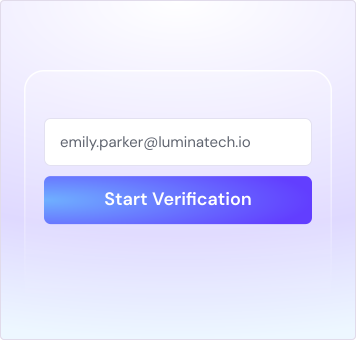
Enter Your Domain Name
Enter your domain name to start the SPF lookup.
Check SPF Record
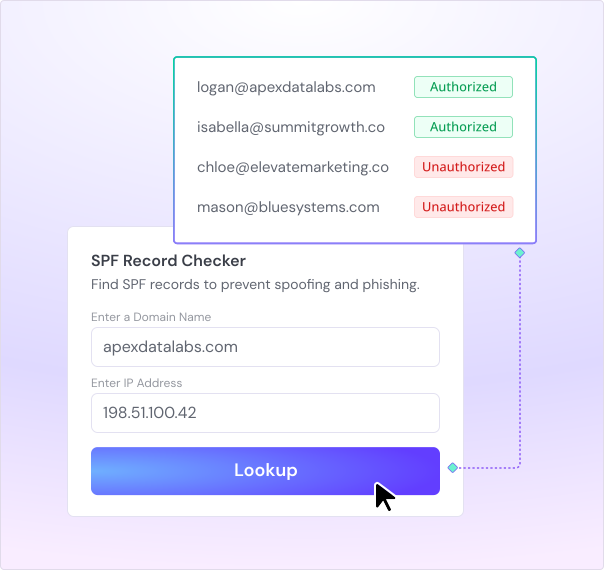
Click the Lookup button to instantly check your domain’s SPF status.

Analyze the Results
Review the SPF record details and make necessary adjustments to protect your domain.

What is SPF and why is it important?
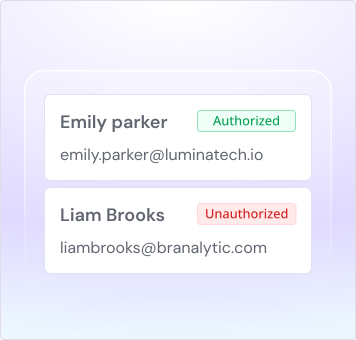
SPF (Sender Policy Framework) is a crucial email authentication method that prevents unauthorized senders from sending emails on behalf of your domain. It verifies that emails sent from your domain come from trusted sources.
Why SPF Matters?

Protects against email spoofing and phishing attacks.
Improves email deliverability by ensuring legitimate emails reach inboxes.
Enhances your domain’s reputation and trustworthiness.
Real-life scenarios where SPF
validation is essential

Prevent email spoofing
If cybercriminals spoof your domain, they can trick recipients into believing your emails are legitimate. Regularly check your SPF records to protect your brand.

Boost marketing emails deliverability
Ensure your marketing emails bypass spam filters and land in inboxes by having a properly configured SPF record

Secure transactional emails
Order confirmations, password resets, billing invoices—if these emails aren’t delivered properly, customers can’t complete transactions or access services. SPF helps email providers verify your messages, ensuring seamless communication.

Manage multiple email providers
If you use third-party services for email marketing or customer support, verify that their sending servers are authorized to send on behalf of your domain
Let’s build your intelligent enterprise outreach engine
Get AI-native operating system for your enterprise sales team
Book a Demo.svg)




.svg)
What our customers say
Founder, StackOptimise
Smartlead's combination of automation, unlimited inboxes, and easy campaign management has completely transformed how we run cold email campaigns.
.jpg)
Founder, Cold Email Hackers

We have about 15 companies and we use Smartlead for all of them.

Founder, DutchSave Media

One of the things I love about using Smartlead is the deliverability feature. If they landed in the bounce or spam folders, we could resolve this quickly.

Co-Founder, Growth Today

I want to continue to use Smartlead to make operations more seamless - the plan is to bring more clients here and build more SOPs.

Founder, FueltoFly

Smartlead listens to the agencies and customers and builds according to what people want, that has really made things easier for us.

Founder, OutboundSync

We build an infrastructure product, and OutboundSync communicates with Smartlead itself. I love the webhook and API. They're really well done and keep getting better.

Founder, Axoleads

With SmartDelivery, you can put all of that in the hands of the tool. It ensures your emails land in inboxes, and by running a simple test, you can see if you're hitting the mark.

Founder, Claygen
Deliverability is the cornerstone of cold email outreach. You could have the best email copy in the world, but if no one is seeing it, it's useless. I really love the feature where you can actually give client accesses to your clients.

Founder, Phyros

I'm amazed at the response time of Smartlead's customer support.

Head of Growth, EraB2B

I didn't want a tool built by a marketing team with flashy features that didn't solve real problems. I wanted a platform built by experts in email deliverability, and Smartlead checked all the boxes. Smartlead isn't just a tool for us, it's a part of our infrastructure.

Founder, Lever Growth

We focus on having consistent email deliverability for us and our clients, and Smartlead has consistently helped us achieve that.

Founder, PLNITUDE

Client Access and white-labeling have been a game-changer, saving us countless hours. With Smartlead, I'm happy with everything, but then I check their Slack community, and there's a new feature that just dropped!
CEO, Agile B2B Sales
SmartDelivery and SmartServers have been instrumental in helping us navigate the ever-changing deliverability landscape. The platform's ability to adapt to deliverability changes and provide real-time insights has been critical to our success.

Founder, frontBrick

Outbound isn't dead; it's just that the bar is higher now. Smartlead allowed me to unify advanced deliverability with multi-channel sequences, and that was a game-changer.

CEO, OneThousandPieces

From the beginning, Smartlead enabled us to build client access. Everything has been driven around making people like us revenue. I've seen the evolution of the tool, and it perfectly aligns with how I evolved myself in my business.

Co-Founder, The Playbook Agency

If you're a founder or a Sales VP looking to book meetings at scale with automation, Smartlead is your best bet.

Founder, Leadgrove.io

Using Smartlead's APIs has been a huge, huge game changer in our business. If you're an agency serious about scaling and signing new clients, Smartlead is the reliable partner you need.

Founder, RevGen Labs

The accessible API was the number one feature that allowed us to build RevReply and automate everything - from response handling to custom reporting.

Founder, Cleverviral

We needed more agency-focused support, and since then, we haven't looked back.

Founder, Cotide
We integrated Smartlead for the whole sending part... we have a complete view.

Co-Founder, The Growth DNA

The decision to incorporate Smartlead was a no-brainer. Smartlead has given us the speed and flexibility to meet our clients' demands quickly.
Founder, Unlock Management

50% of the business is made in Smartlead. Everyone that's doing outbound is using Smartlead. Emails don't go to spam, so why should we change it? In just 30 seconds, you can do everything. Being so simple and so effective at the same time, I think it's really important.

Founder, Brokr Leads

The ability to manage multiple email accounts, track every lead, and enjoy high reply rates through Smartlead has fundamentally changed our business.
Co-Founder, Five Element
Smartlead is an absolute game-changer! With its exceptional features and support, I've experienced remarkable success. I would rate it 10 out of 10 for satisfaction. Smartlead enabled us to save valuable time and resources, leading to increased revenue and improved profitability.
Founder, First LLC
The best one is actually real sending data - you have real hard data, which is, this actually bounced for three other users. The product is solid. I don't feel like I need that many features because the basics are covered.

VP of Operations, KeyOutreach

Intuitive. Game-Changing. POWERFUL. Analytics, spintax, A/B testing, quick personalization. This is a game changer.

Co-Founder, Cymate

I do not want to switch to another software. Pick a solution you trust, stick with it, and keep refining your copy.

CMO, Avalanche Capital

Managing large volumes of emails through multiple inboxes used to be a logistical nightmare. With Smartlead, the process is seamless. We book thousands of discovery calls through cold emails. These campaigns are generating leads at a scale we never thought possible.

Founder, Growth Engine X

We came for the unlimited inboxes, and we stayed for the API. 1.5M cold emails/month, 7,767+ inboxes managed.

Head of Community & Ecosystem, TxtCart

You cannot replace having 10,000 touches with potential clients. When you have that much distribution and reach, you really start to see incredible results. The simplicity of Smartlead made all the difference. It doesn't require you to be a technical wizard.

Founder, Hyperke

Smartlead has been a game-changer for us. It increased our appointment volume, improved ease of use, and offered valuable features. 80% increase in appointments/month, peak of 276 appointments in a single month.

Founder, Kinetyca

Smartlead has been our cold email backbone from day one. The platform evolves constantly, keeping pace with how deliverability and personalization need to work today. 21% overall reply rate, $175K in 4 months for multiple B2B clients.

Founder, Reachflow

Smartlead is centered around deliverability and constantly evolving. Their API is not like any other platform. Smartlead covers all our needs. The focus on core features like deliverability and API integration is unmatched.

CEO, Halfwarm

Our approach to crafting conversational emails led to reply rates that many of my peers thought were unattainable.

Founder, Experiment5m

Smartlead's automation and deliverability features transformed how we run outbound campaigns. This platform has been a game changer for our agency.

Founder, Practical Prospecting

Every cold email tool can automate a sequence, but Smartlead focuses on what truly matters: deliverability and simplicity. Since I started using Smartlead, they seem to come out with new features every month. I've never reached that number in another tool. (referring to 500+ meetings)

Co-Founder, Pitchlane

With Smartlead, Pitchlane's B2B outreach has taken a significant leap forward. Our response rate skyrocketed to 16%. On a scale of 1 to 10, I would give it a solid 100.

Founder, Cold Outreach Systems
Smartlead has helped us break records month after month for booking meetings and managing inboxes. It's super easy to scale without losing quality. We tried other tools, but they were clunky and hard for clients and our team. Smartlead's intuitive design made it the obvious choice.

Founder, Leadodo

Smartlead syncs effortlessly with Leadodo's lead database, making the job much easier for us. Smartlead's support team works 24/7 to help you with any issue, which is a welcome change from other support services.

Co-Founder & COO, Trigify

When we started our agency, we started with Smartlead on cold email, and we got that from zero to 30,000 a month in six months.

CEO, Rock Solid Lead Generation
Smartlead is absolutely amazing! The software is easy to understand. I am not a techie but directly understand everything and if you really have a question the team always helps instantly.

Founder, 10x AI Advisors

SmartDelivery has been the 100% reason we were able to achieve the numbers for our campaigns. Smartlead is the foundation of our cold email success. If Smartlead evolves into agentic AI integration, it will redefine the future of outbound.

CEO, The Pipeline Inc.

Smartlead improved our deliverability and gave us the tools to turn cold emails into conversations. The support team's expertise was the cherry on top.

Founder, Spring Drive

My agency, for all of our clients as well as for our own campaigns, relies on Smartlead. It has truly become a cornerstone of our growth. Our reply rates are approximately 500% higher compared to those we experienced with legacy tools.

Co-Founder & CEO, Danish Lead Co.

We run our entire business on your platform. We're sending plus 500,000 emails a month right now. The fact that we're able to do that and still primarily land in the inbox, all of that wouldn't have been possible without Smartlead.

Founder, Sales Automation Systems

AI will beat me at every level, so I learned how to use it instead of competing against it. 130% company growth in one year, 62% positive reply rate, $8.19M in staffing sales.
Advisor, Trailway Growth

Smartlead, without a doubt, in my opinion, is the best tool in the market for cold email outreach. We're barely scratching the surface of what's possible. It's a foundation for agency growth. $700K+ ARR closed, 33% positive reply rate on 13,000-prospect campaign.

Founder, B2B Boosted
We're probably averaging about 140 meetings per month, and most of them are coming from emails.

CEO, LearnEmail.com & MailGenius

With Smartlead, I was able to generate between 6,000 and 8,000 opt-ins and over 15,000 replies from cold email campaigns. Smartlead has excellent customer support, and Vaibhav is one of the best leaders I've ever seen. 620 replies in a single day with just 178 mailboxes. I scaled up to 8,800 emails a day and 450,000 emails a month.

Co-Founder, letstrike

I started in cold email with a Google Sheet hack. Now we run everything from a single platform that handles hundreds of clients, multiple domains, advanced analytics.

Founder, EmailAnalytics

When we started using it, we were pretty happy with the results and the ease of use. Once we got used to it, there was really not been any reason to move away from it. Smartlead enables us to use custom domains for tracking, which improves deliverability.

Partner & COO, Done For You Meetings

Smartlead has been a game-changer for us. The API and automation features have allowed us to streamline our processes and scale our campaigns without adding more team members.
Founder, Growth Engine X
We came for the unlimited inboxes, and we stayed for the API. 1.5M cold emails/month, 7,767+ inboxes managed.
Head of Community & Ecosystem, TxtCart
You cannot replace having 10,000 touches with potential clients. When you have that much distribution and reach, you really start to see incredible results. The simplicity of Smartlead made all the difference. It doesn't require you to be a technical wizard.
Founder, Hyperke
Smartlead has been a game-changer for us. It increased our appointment volume, improved ease of use, and offered valuable features. 80% increase in appointments/month, peak of 276 appointments in a single month.
Founder, Kinetyca
Smartlead has been our cold email backbone from day one. The platform evolves constantly, keeping pace with how deliverability and personalization need to work today. 21% overall reply rate, $175K in 4 months for multiple B2B clients.
Founder, Reachflow
Smartlead is centered around deliverability and constantly evolving. Their API is not like any other platform. Smartlead covers all our needs. The focus on core features like deliverability and API integration is unmatched.
CEO, Halfwarm
Our approach to crafting conversational emails led to reply rates that many of my peers thought were unattainable.
Founder, Experiment5m
Smartlead's automation and deliverability features transformed how we run outbound campaigns. This platform has been a game changer for our agency.
Founder, Practical Prospecting
Every cold email tool can automate a sequence, but Smartlead focuses on what truly matters: deliverability and simplicity. Since I started using Smartlead, they seem to come out with new features every month. I've never reached that number in another tool. (referring to 500+ meetings)
Co-Founder, Pitchlane
With Smartlead, Pitchlane's B2B outreach has taken a significant leap forward. Our response rate skyrocketed to 16%. On a scale of 1 to 10, I would give it a solid 100.
Founder, Cold Outreach Systems
Smartlead has helped us break records month after month for booking meetings and managing inboxes. It's super easy to scale without losing quality. We tried other tools, but they were clunky and hard for clients and our team. Smartlead's intuitive design made it the obvious choice.
Founder, Leadodo
Smartlead syncs effortlessly with Leadodo's lead database, making the job much easier for us. Smartlead's support team works 24/7 to help you with any issue, which is a welcome change from other support services.
Co-Founder & COO, Trigify
When we started our agency, we started with Smartlead on cold email, and we got that from zero to 30,000 a month in six months.
CEO, Rock Solid Lead Generation
Smartlead is absolutely amazing! The software is easy to understand. I am not a techie but directly understand everything and if you really have a question the team always helps instantly.
Founder, 10x AI Advisors
SmartDelivery has been the 100% reason we were able to achieve the numbers for our campaigns. Smartlead is the foundation of our cold email success. If Smartlead evolves into agentic AI integration, it will redefine the future of outbound.
CEO, The Pipeline Inc.
Smartlead improved our deliverability and gave us the tools to turn cold emails into conversations. The support team's expertise was the cherry on top.
Founder, Spring Drive
My agency, for all of our clients as well as for our own campaigns, relies on Smartlead. It has truly become a cornerstone of our growth. Our reply rates are approximately 500% higher compared to those we experienced with legacy tools.
Co-Founder & CEO, Danish Lead Co.
We run our entire business on your platform. We're sending plus 500,000 emails a month right now. The fact that we're able to do that and still primarily land in the inbox, all of that wouldn't have been possible without Smartlead.
Founder, Sales Automation Systems
AI will beat me at every level, so I learned how to use it instead of competing against it. 130% company growth in one year, 62% positive reply rate, $8.19M in staffing sales.
Advisor, Trailway Growth
Smartlead, without a doubt, in my opinion, is the best tool in the market for cold email outreach. We're barely scratching the surface of what's possible. It's a foundation for agency growth. $700K+ ARR closed, 33% positive reply rate on 13,000-prospect campaign.
Founder, B2B Boosted
We're probably averaging about 140 meetings per month, and most of them are coming from emails.
CEO, LearnEmail.com & MailGenius
With Smartlead, I was able to generate between 6,000 and 8,000 opt-ins and over 15,000 replies from cold email campaigns. Smartlead has excellent customer support, and Vaibhav is one of the best leaders I've ever seen. 620 replies in a single day with just 178 mailboxes. I scaled up to 8,800 emails a day and 450,000 emails a month.
Co-Founder, letstrike
I started in cold email with a Google Sheet hack. Now we run everything from a single platform that handles hundreds of clients, multiple domains, advanced analytics.
Founder, EmailAnalytics
When we started using it, we were pretty happy with the results and the ease of use. Once we got used to it, there was really not been any reason to move away from it. Smartlead enables us to use custom domains for tracking, which improves deliverability.
Partner & COO, Done For You Meetings
Smartlead has been a game-changer for us. The API and automation features have allowed us to streamline our processes and scale our campaigns without adding more team members.

Co-Founder, letstrike
We've grown on zero capital, zero marketing, purely cold emailing - and that's the story we love to tell. The best approach is no approach if you can't handle domain meltdown. The second best is something like Smartlead that's built from the ground up for deliverability at scale.

Founder, Fenixtal

Smartlead's white-labeling and automation let us punch above our weight. The 12M euros sales potential? That's what happens when you combine human creativity with Smartlead's precision.

Co-Founder, Digital Creativs

Nine out of 10. Ninety percent of our clients are on Smartlead unless they come in with an existing setup. That's the default.

Co-Founder, BuildingReach

At the end of the day, you have to take a bet on one tool or another. It was a no-brainer taking that bet on Smartlead. We had to even turn down the volume of our marketing campaigns - Smartlead was capable of driving more volume than our sales team was able to fulfill.

Founder & MD, Prospectiv

Since starting the business in January of this year, we've already generated $200K in sales exclusively from cold email. Smartlead has been central to our operations and has exceeded our expectations.

Founder, Growthlynk

There's so much stuff built on top of it. I would be dead if I had to rebuild it with another tool. I can manage hundreds of senders easily. I can send hundreds of thousands of emails.

Founder, Corebits

The platform's HubSpot integration, real-time Slack updates, and advanced campaign customization have been game changers for our business and our clients'.

Founder, Apex Ascension

From day one, we've never used anything else.

Founder, Leadmoves

Since using Smartlead, my clients have added millions in pipeline revenue, closed six-figure deals, and gotten 38 new customers in a single month.

Founder, Virtus Medium

Everything under one roof: I can see campaigns, leads, and domain status without leaving the platform. Warm-up that I can forget about: The system ramps send volume on its own, which frees my time.

Founder & CEO, Wind Growth

If you're a big automation enthusiast like me, there are no other tools on the market that allow you to 100% automate your business as Smartlead does. Smartlead easily saves me about 40 hours per week.

Founder, AvoraGrowth

The way you can create client sub-accounts on Smartlead is like no other tool out there. They're super simple, super cheap. Everything at the moment that you have in Smartlead is amazing. There's nothing really that needs to be changed specifically for our use case.

Co-Founder, The Kiln

I think people who are at the forefront of the correct tech tools like Smartlead and Clay are going to be the runaway leaders. We've had several clients that we've generated millions of dollars for, just using Smartlead campaigns.

Founder, Leveraged Outbound

My entire business is pretty much built upon Smartlead. Without it, I wouldn't have any business. Smartlead helped us save 80% of our time, book 20-30 monthly meetings, and close six-figure deals for our clients.

Founder & CEO, Soteria Media

The APIs and automations you can do with Smartlead are out of this world and it helps me run my business very smoothly.

Founder, FinestGC

Using Smartlead has been a total game-changer and has been one of the primary drivers in our ability to generate over $12M in the pipeline for our clients last year. The Master Inbox alone has saved us a considerable amount of time, the custom tagging system and subsequences save us at least 2 hours a day.

Account Executive

I like how easy it is to launch a campaign with Smartlead and how effective it is at delivering emails. It allows me to use multiple inboxes that it creates to safely send emails in bulk. The initial setup was very easy, and this contributes to the overall user-friendliness of Smartlead.
Co-Founder, Digital Creativs
The platform and features continue to be updated and improved. Strong founder who cares about what users want to see and an amazing support team. The office hours on various topics such as email deliverability with the experts is nothing like I've seen for other SaaS products and the Smartlead Slack community is a cherry on top.

Member, Lambda Group

I love the community and their Slack channel. I'm also thrilled with the AI inbox manager after the latest update because it saves us a lot of time, eliminating the need for VAs to manage inbox tasks. The setup was quite easy and they provide really extensive documentation and a very helpful community.
Founder, Hyperke
I really appreciate the amazing customer support from Smartlead. Nobody even comes close in comparison. The founder Vaibhav is super helpful and hands-on with everything. The tool itself is reliable and technically sound. Plus, their APIs work well, which is another big plus for me.

VP of Accounts, A-SALES

A comprehensive email outreach platform that converts cold emails into consistent qualified sales meetings for us, and our clients. It helps scale outreach with unlimited mailboxes, unlimited warmups, a limitless multi-channel infrastructure, and a unified inbox so we can manage our entire revenue cycle in one place.
Founder, Reachflow
Smartlead is centered around deliverability and constantly evolving. Their API is not like any other platform. Smartlead covers all our needs. The focus on core features like deliverability and API integration is unmatched.
Co-Founder & CEO, Danish Lead Co.
Smartlead is the backbone of our cold email infrastructure. We run our entire business on your platform. We're sending plus 500,000 emails a month right now. The fact that we're able to do that and still primarily land in the inbox, all of that wouldn't have been possible without Smartlead.
Co-Founder, The Growth DNA
The decision to incorporate Smartlead was a no-brainer. Smartlead has given us the speed and flexibility to meet our clients' demands quickly.
CEO, OneThousandPieces
I use Smartlead.ai every day across all my client accounts and it's become absolutely indispensable! From the beginning, Smartlead enabled us to build client access. Everything has been driven around making people like us revenue.
Chief Executive Officer, Infoxify
It is a seasoned/advanced tool to send cold emails to your prospects. Many great features are there to improve the deliverability. Customer support is very nice, though it may take a while for you to get answer (It's not prompt response unless you are on their higher tier plan).
Founder, PLNITUDE

Game changing tool for my agency, helping us generate 6-figures+ for our lead generation clients! Client Access and white-labeling have been a game-changer, saving us countless hours. With Smartlead, I'm happy with everything, but then I check their Slack community, and there's a new feature that just dropped!

Associate Manager - Marketing

I use Smartlead for cold outreach, and it really simplifies things for me. I love how it handles the email warming up automatically and delivers emails without harming my domains. It's easy to use, and anyone can start with it, which is great. I also appreciate the option to set specific intervals between each email sent, as it just works right.
Powerful automated workflows that drive sales.
Frequently asked questions
What is an SPF record, and why do I need it?
An SPF record (Sender Policy Framework record) is a record published in your domain's DNS that specifies authorized email senders for your domain. It acts like a security guard, preventing email spoofing, where scammers disguise their emails to appear from your domain. SPF helps protect your reputation, improve email deliverability, and avoid phishing attacks.
What are the benefits of using an SPF record lookup tool?
1. Improved Email Security: Ensures your SPF record is valid, helping prevent email spoofing.
2. Troubleshooting: Helps identify problems with your SPF record if you have email delivery issues.
3. Peace of Mind: Provides confidence that your SPF record is functioning correctly.
Where Can I Find My SPF Record?
You can find your SPF record by querying your domain's DNS records using online tools or commands like dig or nslookup. Look for the TXT record associated with your domain, which contains your SPF record detailing authorised email servers.
Do I Need To Update My SPF Record Every Time I Change Email Providers?
Yes, you should update your SPF record whenever you change email providers or add new authorised sending servers. This ensures that your SPF record accurately reflects the servers allowed to send emails on behalf of your domain.
Can I Have Multiple SPF Records For My Domain?
No, you should have only one SPF record per domain. Multiple SPF records can cause conflicts and DNS lookup issues, potentially leading to email delivery problems.
How Can I Configure SPF For Subdomains?
You can configure SPF for subdomains by creating a separate SPF record for each subdomain. Use the include mechanism to reference the main domain's SPF record if the subdomain shares the same email servers.
How does an SPF record lookup work?
An SPF record lookup is done using a free online tool like Smartlead’s SPF Record Tool. These tools retrieve the SPF record published in a domain's DNS and analyze it for errors. They provide feedback on whether the record is configured correctly and effectively authorizes email senders for that domain.
Do I need to be a tech expert to manage SPF records?
While understanding the basics is helpful, you don't necessarily need to be a tech expert. Many domain registrars and email service providers offer user-friendly interfaces or instructions to help you set up and manage SPF records. You can also use online resources and tutorials for guidance.
How Do I Use the SPF Generator?
Using the Smartlead SPF Generator is simple. Enter your domain name in the provided field, and our tool will guide you through the process of defining the IP addresses authorised to send emails for your domain. Once complete, you'll receive a valid SPF record that can be added to your DNS as a TXT record.
What Are The Different Mechanisms I Can Use In My SPF Record?
Common mechanisms in SPF records include:
include: Includes SPF records from other domains
a: Authorises domain's A records (IPv4 addresses)
mx: Authorises domain's MX records (mail servers)
ip4/ip6: Specific IPv4 or IPv6 addresses
all: Specifies handling for emails not matching previous mechanisms (+, -, ~).
What Should I Do If My SPF Record Fails A Test?
If your SPF record fails a test, review the mechanisms and syntax for errors. Ensure all authorized servers are correctly listed. Update and re-publish the SPF record in your DNS. Use SPF testing tools to verify corrections.
What Are The Limitations Of An SPF Record?
SPF records have limitations such as:
1. Inability to protect against all types of email fraud.
2. Complexity in managing IP addresses and third-party services.
3. Dependency on DNS propagation times.
4. Potential for misconfiguration leading to email delivery issues.